

End of Financial Year FY23/24 with foundU
Every year we put together an assemblage of tools and resources to support you throughout the period and this year is no different. Keep an eye on your inbox and pop ups in the platform for upcoming reminders and updates. Here are some resources your can access right now!
Preparing for EOFY Video
 Watch video
EOFY Masterclass - Watch on Demand
Watch this webinar to take you through all required EOFY processes in your foundU platform.
Watch now

Apply Annual National Minimum Wage & Award Increase with our Rate Rise Tool
The Fair Work Commission announced this years Minimum Award & Wage will increase by 3.75% effective 1 July 2024. This needs to applied before your first full pay period in the new financial year. Here's how you can apply them in your platform:
|
1. DIY: foundU's Rate Rise Tool is the key to applying the increases! It helps you easily manage wage increases in bulk for your employees. 2. Book Assistance: Get an assisted rate rise session to help you apply your wage increases correctly. Sessions cost $350 + GST. Book here. You will need the latest Pay Guides to apply the rate rises. These have been released and can be accessed here: |
Please note: The earliest you can schedule your rate increase is for next day after you complete the rate rise as the process runs overnight. For example, if you are completing the rate rise steps today, the earliest you can select for it to run the update is tomorrow.
EOFY Timeline
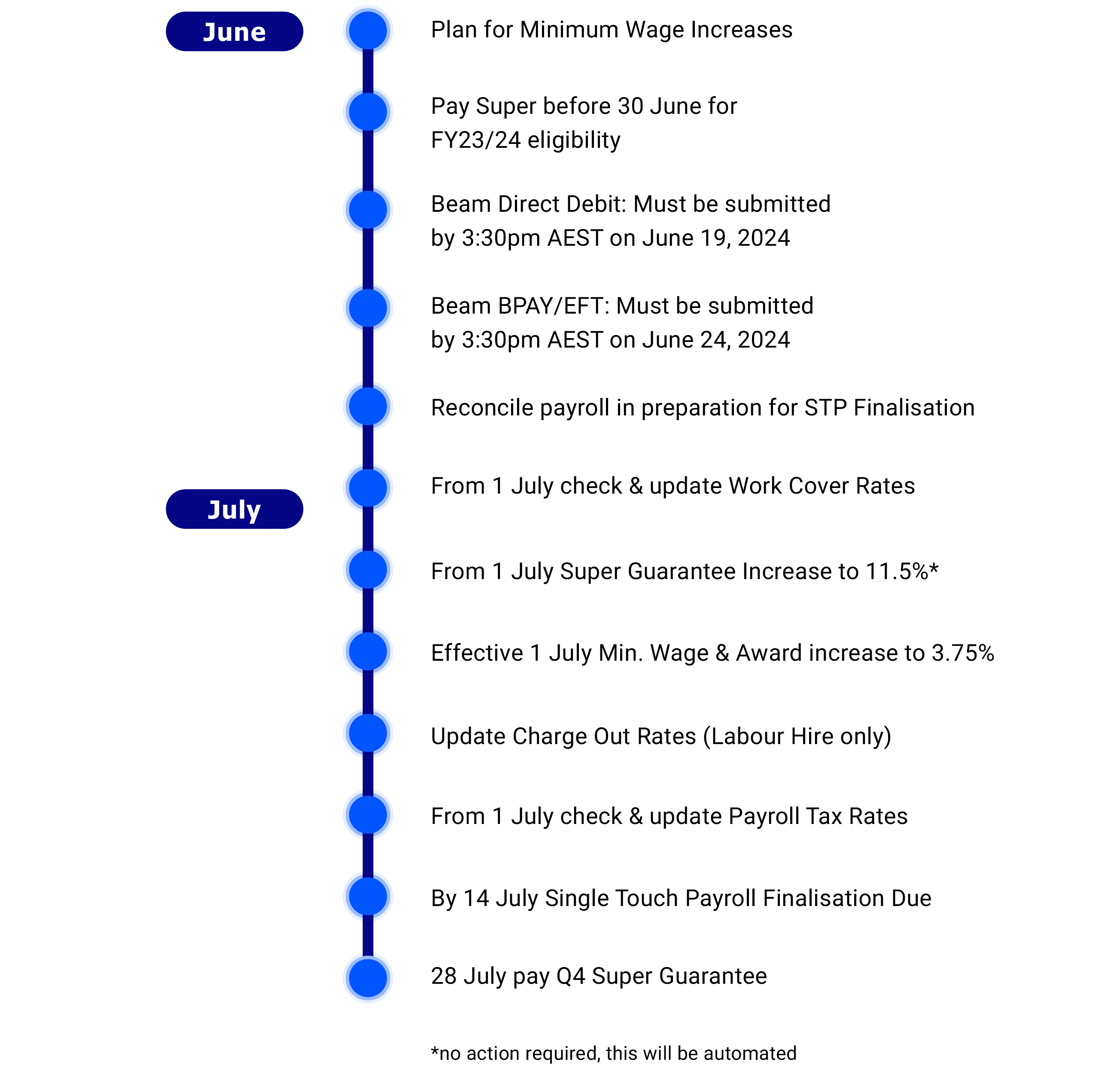
EOFY Checklist 2023/24
Reconciliation & STP Finalisation
Single Touch Payroll (STP) finalisation for the end of the financial year is due by 14 July 2024.
As part of your STP finalisation process, we highly recommend reconciling your payroll and STP data first. This will help to ensure that the data you send to the ATO matches your payroll data. After reconciling you're ready to finalise STP.
You can also import employee fringe benefits at the end of each year (if this applies to your business) as part of the STP finalisation process.
Employee Income Statements
Once you've reported and finalised your employees' data through STP, you won't need to provide income statements (payment summaries) or make any payment summary annual report lodgments to the ATO. Instead, income statements will automatically appear as 'Tax ready' in your employees' myGov accounts.
In addition, your employees get access to an efficient and discounted tax return service through our partnership with One Click Life. This service is conveniently accessible via a link in the employee's Payslips page in their Employee App.
To remind your employees about accessing their income statement and to inform them about the tax return service offer, you may consider publishing an announcement in the Employee App or send a bulk email.
Super Guarantee Increase to 11.5% - handled by foundU
This will apply to any payments made on or after 1 July. However there may be some items you need to review. View more information here.
Tax Tables Update - handled by foundU
2024.This will apply to any payments made on or after 1 July.
Comments
0 comments